
Universal Print: Cloud Print Management for Microsoft 365 Environments
Universal Print provides cloud-managed printing for Microsoft 365 environments without requiring every user device to depend on a traditional print server.
Updated note (2026): This article has been expanded to reflect the current Universal Print service model and Microsoft Entra ID terminology. Verify licensing, supported clients and printer capabilities in Microsoft documentation before a production rollout.
What Universal Print Is
Universal Print is Microsoft’s cloud print service for organizations using Microsoft 365. Printers are registered in the service, shared to entitled users or groups, and discovered from supported user devices through a familiar print experience. Users do not need to locate an on-premises print server or connect over VPN simply to submit a print job.
The architectural benefit is not that printing disappears. Printing still needs ownership, physical devices, supplies, security controls and support. The benefit is that management moves away from a collection of Windows print servers and device-specific endpoint drivers toward a centrally governed cloud service with identity-based assignment.
When It Makes Sense
Universal Print is a good candidate when an organization is adopting Microsoft Entra joined or hybrid joined devices, managing endpoints through Microsoft Intune, supporting remote or mobile workers, or delivering desktops through Azure Virtual Desktop (AVD). In those situations, relying on a traditional office-network print server can force users onto a VPN and make printer discovery dependent on network location.
It is also useful when an enterprise wants a consistent printer inventory and assignment model. An organization can define ownership, location and permitted groups rather than allowing ad hoc queues to accumulate.
Universal Print is not automatically the right replacement for every specialist printing workflow. Devices with finishing features, label production, high-volume batch output, offline requirements or application-specific driver dependencies need validation during a pilot.
Architecture Overview
A typical Universal Print design contains four components:
- Microsoft Entra ID identities and groups used to control access to shared printers.
- Universal Print in Microsoft 365, where printers are registered, shared and monitored.
- Printers that either connect directly to the service or use a connector.
- User endpoints, potentially managed by Intune or provided through AVD, from which users discover or receive assigned printers.
Print jobs are submitted through the cloud service. This supports users who are not on the office network, but it means internet connectivity and data-handling considerations should be assessed. Printing may contain commercially sensitive, personal or regulated information; it should be covered by the same information governance conversations as other document workflows.
Printer Options
Universal Print-Ready Printers
Universal Print-ready printers contain firmware or an approved capability that communicates directly with the service. This design removes the need for an intermediary Windows connector host. For new office deployments, native support can simplify operations because there is less server infrastructure to patch and monitor.
Connector-Based Printers
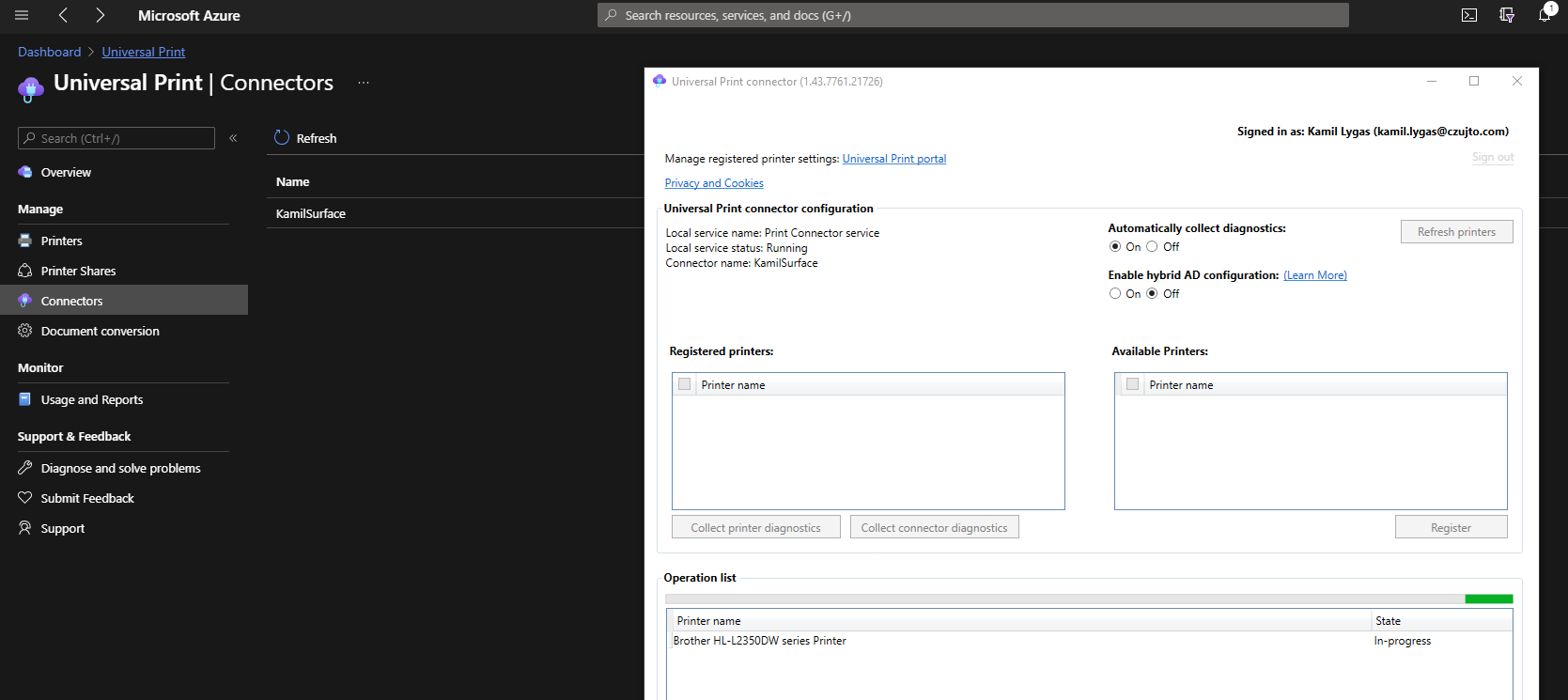
Existing printers that do not connect directly to Universal Print can be exposed using the Universal Print connector. The connector is a Windows application installed on a machine that has direct access to the printers and remains available when users need to print. It registers printers, collects jobs from Universal Print and passes them to the target device.
The connector is a sensible transition mechanism, especially where replacing functioning printer estates would be wasteful. However, it does not eliminate all local dependency: connector hosts need lifecycle management, monitoring, internet access and network connectivity to the printers. For resilient sites, architects should decide whether a failed connector is acceptable or whether connector capacity and recovery require a documented design.
Identity and Access Model
Printer assignment should be designed with Microsoft Entra ID groups, not individual manual grants. Groups can represent a site, floor, function or permitted use case, for example a controlled finance printer or a general shared printer in a regional office.
A practical naming model includes country or site, building or floor, usage and device identity. Meaningful location fields make discovery usable for employees who do not already know queue names. Access groups should have owners and a review process, especially where printers handle sensitive material.
Separate printer administration from general endpoint administration where operational responsibilities differ. The team managing physical devices may not need broad cloud platform rights, while service administrators should not need unrestricted access to unrelated Microsoft 365 services.
Administrator Setup Flow
The exact portal screens evolve, but an enterprise setup normally follows this sequence:
- Confirm service availability, licensing and supported client requirements using current Microsoft documentation.
- Establish printer naming, location, ownership, support and access-group standards.
- Register native Universal Print-ready devices, or deploy and configure a connector for existing printers.
- Share registered printers and grant access to the appropriate Microsoft Entra ID groups.
- Test discovery, installation, printing and support telemetry with a pilot population.
- Deploy printers to managed users or devices where automatic provisioning is required.
- Document operational ownership, incident handling and retirement of replaced queues or print servers.
User Experience
On supported Windows devices, users can discover printers made available to them and print through the usual application workflow. For a user moving between offices or using a remote desktop, identity-based printer access can be much simpler than mapping an old print server share through a corporate network.
For AVD, this can be particularly valuable where desktop access is delivered independently of the office network. The platform team should test printer discovery and document-printing performance from representative AVD sessions, while ensuring the access model does not expose location-specific or sensitive printers to users who do not require them.
Intune Deployment Considerations
Where users need a predictable default set of printers, Intune can deploy Universal Print printers through the settings catalog. Microsoft has deprecated older printer-provisioning tooling in favor of the current Intune policy approach. Automatic deployment should still be selective: assigning every printer to every user creates poor usability and weakens governance.
Endpoint and workplace teams should align Intune assignments with the same Entra groups used for access, and test Windows versions, shared-device behavior and removal of obsolete queues. A migration should deliberately remove replaced print server mappings to avoid confusion and duplicate queues.
Security and Governance Considerations
Printing is a data path. The architecture should identify what information may be printed, who can access particular devices, how abandoned output is handled and whether secure-release or specialized partner features are needed. Access to a printer should follow least privilege and business need.
Operational controls should include:
- Named owners for printers, connector hosts and access groups.
- Documented naming and location conventions.
- Monitoring of printer registration, connector health, failed jobs and usage trends.
- Patch and firmware processes for devices and connector machines.
- A review of data protection and regulatory requirements for print jobs handled through a cloud service.
- Controlled retirement of print servers and unused queues after migration.
Limitations and Operational Considerations
Universal Print depends on service connectivity. Connector-backed printers also depend on a functioning connector and local network reachability. Specialist device capabilities may need manufacturer support or an additional solution. Printing volume and license entitlements should be assessed against actual workload; verify current licensing and quotas in Microsoft documentation.
A pilot should include ordinary documents, sensitive-output scenarios, remote users, AVD users if relevant, more than one office location and support troubleshooting. Monitoring is not merely a dashboard exercise: support staff need to determine whether a failure occurred at user access, cloud submission, connector processing or the physical printer.
Enterprise Architecture Takeaways
Universal Print can remove an unnecessary dependency on traditional print servers for cloud-oriented users, but its successful adoption depends on service design. Treat printer inventory, location metadata, group assignment, connector resilience and operational monitoring as platform concerns. That approach makes printing a governed capability available to workplace and product teams rather than an exception bound to a legacy network.
Summary
Universal Print is most useful when an enterprise already relies on Microsoft Entra ID, Microsoft 365, managed endpoints or Azure Virtual Desktop and wants centrally managed print access for users in different locations. Select native printers where practical, use connectors as a managed transition path, control access with groups and validate specialist needs before migration.
Further Reading
Follow Azure architecture notes
Follow new Azure architecture notes via RSS or connect with me on LinkedIn. Public technical work is also available on GitHub. For focused platform feedback, see Azure architecture reviews.